CHI 97 Electronic Publications: Late-Breaking/Interactive Posters
Focus+Context Visualization with Flip Zooming and the Zoom Browser
Lars Erik Holmquist
SSKKII
G�teborg University
S-412 98 G�teborg
Sweden
+46 31 773 52 34
leh@ling.gu.se
ABSTRACT
Flip zooming is a novel focus+context technique for visualizing
large data sets. It offers an overview of the data, and
gives users instant access to any part. Originally developed
for visualizing large documents, the method might be
adapted for different types of information, including web
pages, image collections and as a general windowing interface.
A first practical demonstration of flip zooming is the
Zoom Browser, a World Wide Web-browser that uses flip
zooming to present web-pages.
Keywords
Focus+context views, information visualization, graphical user interfaces, World Wide Web
© 1997 Copyright on this material is held by the authors.
INTRODUCTION
Information overflow is an important subject for HCI
research. As the amount of data that users work with grows,
the limits of the computer screen become apparent. One
approach to solving the problem of presenting large
amounts of data simultaneously on-screen is focus+context
visualization. This means that some part of the information
is presented in detail (the focus) while the rest is still available,
but at a smaller size (the context). An overview and
further references can be found in [2].
One important type of information is text documents.
Focus+context methods suitable for visualizing documents
include the perspective wall and the document lens [3].
With the growth of the Internet's World Wide Web, finding methods
to visualize information available on the web is becoming
increasingly important. Applications that use
focus+context techniques to present WWW-based information
include the hyperbolic tree browser [3] and
Pad++ [1].
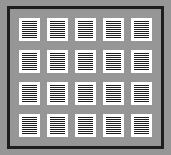
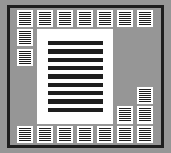
Figure 1. The principles of flip zooming: Unzoomed view
(left) and zoomed view (right)
FLIP ZOOMING
Our focus+context technique is called flip zooming because
users can "flip" through a document like the pages in a
book. It was inspired by some previously developed
focus+context methods, most notably the document lens.
However, unlike the document lens it does not introduce
any spatial distortion to the presented material.
A dataset that is to be visualized is first divided into a number
of equally sized parts, called pages. For a large document
each page is a section of the text. The pages are then
laid out as thumbnail sketches on the display in a left-to-right,
top-to bottom order. When users want to view a certain
page, they can click on it to bring it into focus. The
page is then expanded to a size suitable for reading. All
surrounding pages are shrunk and re-arranged to make place,
keeping the left-to-right, top-to-bottom page ordering intact
(see Figures 1 and 2). Users can then either continue to
choose focus pages randomly or, using GUI buttons, "flip"
backwards or forwards to surrounding pages in the dataset.

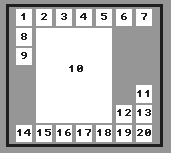
Figure 2. Page numbering in the unzoomed view (left)
and zoomed view (right)
Advantages of flip zooming
Flip zooming offers several advantages over previous
distortion-based views. Since no spatial deformation takes
place, the material outside the focus is easier to read. No
computational-heavy geometrical transformations are
needed, which makes it well suited for interactive applications.
The non-focus pages need not consist of thumbnail
representations; for instance, some method could be used to
provide a readable summary or other visual representation
of the contents of a page.
Problems
An important problem is that of scalability. When a certain
number of pages are introduced, they become too small to
convey any useful information. A solution might be to
introduce some hierarchial ordering, so that pages can be
grouped together and hidden while not in use. For instance,
a book might be divided into chapters, each represented by a
single page on the display. Chapters could then be "opened"
or "closed" by users, revealing or hiding the actual pages.
Another problem is the unpredictable way in which focus
pages appear, due to the fact that pages are moved around to
maximize the use of screen space. The Zoom Browser tries
to minimize this problem by attempting to place the pages
as close as possible to the user's center of attention.
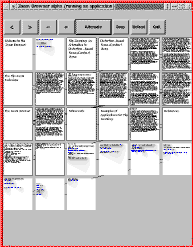
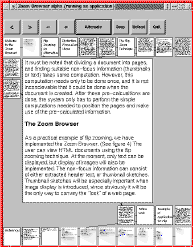
Figure 3. The Zoom Browser: unzoomed view (left) and
zoomed view (right)
THE ZOOM BROWSER
The Zoom Browser (Figure 3) is the first implementation of
the flip zoom technique. It is a web-browser (currently textonly)
which can be used to download and view HTML documents
on the WWW. It is implemented in Java, which
makes it easy to integrate with other web-based services.
When a web document is loaded into the browser, it is split
up into a suitable number of pages that are added to the
display. Users can then navigate through the pages using the
flip zoom technique, and click on links in the text to load
new documents. Previously viewed documents remain visible,
providing a kind of history mechanism, but can be
removed if the display becomes crowded.
As a simple form of semantic zooming, we have used information
in the HTML code to provide users with an alternative
to thumbnail sketches. The headers and sub-headers in
a document can be presented at a readable size on the non-focus
pages. This makes it easy to find specific sections in
the text, provided they are indicated by headers.
User reactions to the Zoom Browser
Users that tried out the application expressed a liking of the
way that the Zoom Browser provides an overview of documents.
Opinions were divided on whether the pages should
be allowed to change position during use. Some found it
irritating, while others did not think it was a problem. One
user had trouble accepting the left-to-right arrangement of
pages, and would have preferred a top-to-bottom method,
more closely related to the way text scrolls in traditional
text-viewers. Although far from being perfect, the Zoom
Browser seemed to be a good starting point for further
discussions on the possibilities of focus+context visualization.
POSSIBLE FUTURE WORK
Interactive searching and editing
Flip zooming might be useful when searching or editing
large documents, program code, etc. When doing searches,
the search term could be highlighted on all the context
pages where it appeared. When editing, users would have an
instant overview of a text or a programming project. Since
several documents can be displayed simultaneously, it could
for example be used to simultaneously edit several source
files in a programming project.
Introduction of hierarchial ordering
To make it possible to handle larger data sets, hierarchial
ordering of the pages might be introduced. For instance,
when editing a programming project, pages belonging to a
certain function could be hidden when it is not in focus,
leaving only a page with the function name visible.
Flip zooming as a windowing system
Flip zooming could be a novel alternative to standard windowing
interfaces, such as X Windows. A windowing system
based on flip zooming would allow all windows to be
visible at all times, with no need for overlapping windows.
CONCLUSION
Flip zooming is an efficient and flexible focus+context
visualization technique suitable for many applications. The
Zoom Browser, a web browser which uses the technique to
present web pages, serves as an interesting starting point for
further experimentation and development of the method.
ACKNOWLEDGEMENTS
Thanks to Christopher Ahlberg and Erik Wistrand at IVEE
Development AB for their help and suggestions. This work
was funded by the Swedish National Board for Industrial
and Technical Development (NUTEK).
DEMO VERSION OF THE ZOOM BROWSER
A demo version of the Zoom Browser can be found at
http://www.ling.gu.se/~leh/zoom/
REFERENCES
1. Bederson, B., Hollan, J., Perlin, K., Meyer, J., Bacon,
D., and Furnas, G., Advances in the Pad++ Zoomable
Graphics Widget, Journal of Visual Languages and
Computing, no. 7, 1996.
2. Leung, Y. K., Apperley, M. D., A Review and Taxonomy
of Distortion-Oriented Presentation Techniques,
ACM Transactions on Computer-Human Interaction,
vol. 1 no. 2, 1994.
3. Rao, R., Pedersen, J. O., Hearst, M. A., Mackinlay, J. D,
Card, S. K., Masinter, L., Halvorsen, P-K., Robertson,
G. G, Rich Interaction in the Digital Library, Communications
of the ACM, vol. 38 no. 4, 1995.
CHI 97 Electronic Publications: Late-Breaking/Interactive Posters